Intro
Good examples are short. Here i present my step by step guide for:
- Plain Map with a straight line as moutains and a pass-through
- Dynamic player size
Creating the project
- We open the Content Editor and choose: Create A New Mod
- We pick Generated Map
- We choose the Basic Template
- Generated Map Name is “BasicMoutainPass” and Display Name is “Basic Mountain Pass”
- We give it a Mod Description
- We Finish the startup settings, now the Content Editor appears
Fill tiles
We do not want a single tile being undefined! This will return as an exception later on. So we starting with filling the full grid as tt_plains
Thats the starting point:
mapHalfSize = math.ceil(gridSize/2)
mapQuarterSize = math.ceil(gridSize/4)
mapEighthSize = math.ceil(gridSize/8)

--Here's a basic loop that will iterate through all tiles in your map
for row = 1, gridSize do
	for col = 1, gridSize do

	--do stuff with the grid here


	end
end
It will return into this:
mapHalfSize = math.ceil(gridSize/2)
mapQuarterSize = math.ceil(gridSize/4)
mapEighthSize = math.ceil(gridSize/8)

--Here's a basic loop that will iterate through all tiles in your map
for row = 1, gridSize do
	for col = 1, gridSize do

	-- Fill every row and column with tt_plains
    terrainLayoutResult[row][col].terrainType = tt_plains

	end
end

-- SETUP PLAYER STARTS-------------------------------------------------------------------------------------------------
Creating the mountain
Our grid will look similar to this now:
When we build the mod(F7) now and run this map in Age of Empires IV it will be gnerated like this:
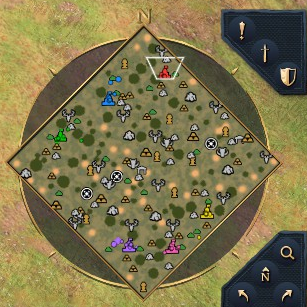
Very similar to the Dry Arabica Map, our map just contains plain tiles and is very much flat and our players has been set automatically in a circle-like spawn area. Also the ressources has been placed automatically by the game.
After we make the whole map as plain terrain, we will make a straight vertical mountain line, therefore we use another for loop.
- For each Row, we get the middle point of the map
- The middle point we just got, will be set to be moutain terrain by using: tt_mountains
mapHalfSize = math.ceil(gridSize/2)
mapQuarterSize = math.ceil(gridSize/4)
mapEighthSize = math.ceil(gridSize/8)

--Here's a basic loop that will iterate through all squares in your map
for row = 1, gridSize do
	for col = 1, gridSize do

	--do stuff with the grid here
	terrainLayoutResult[row][col].terrainType = tt_plains
	end
end

--Make the mountains on each ROW at the midpoint of the map
for row = 1, gridSize do

	terrainLayoutResult[row][mapHalfSize].terrainType = tt_mountains

end

-- SETUP PLAYER STARTS-------------------------------------------------------------------------------------------------
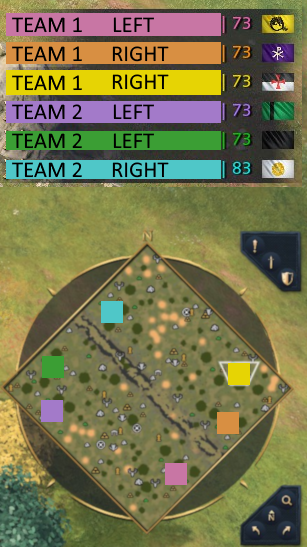
Now our tile layout looks like this:
It will be generated this way:
Player spawns
We can see that, the teams are not seperated on the sides of the mountains, it still spawn them as a circle. We have 2 ways now:
- Instead of a circular spawn, we want to use the PlacePlayerStartsDivided, to ensure players are divided on each side of the mountains
- Set the player spawn, mathematically on the tiles on both sides
We gonna use 1. since it alrady does, what we want to archive. The parameters are almost same to the PlacePlayerStartsRing except for the vertical direction:
The direction is either vertical(true) or horizontal(false). So we create a new variable and place it behind cornerThreshold in the parameters:
placeStartBuffer = true

-- true since we created the mountains on each ROW at their center / otherwise we would had done it at each column's center
isVertical = true

-- Dont forget to add the isVertical AFTER the cornerThreshold
terrainLayoutResult = PlacePlayerStartsDivided(teamMappingTable, minTeamDistance, minPlayerDistance, edgeBuffer, innerExclusion, cornerThreshold, isVertical, impasseTypes, impasseDistance, topSelectionThreshold, playerStartTerrain, startBufferTerrain, startBufferRadius, placeStartBuffer, terrainLayoutResult)
The new result will look like this:
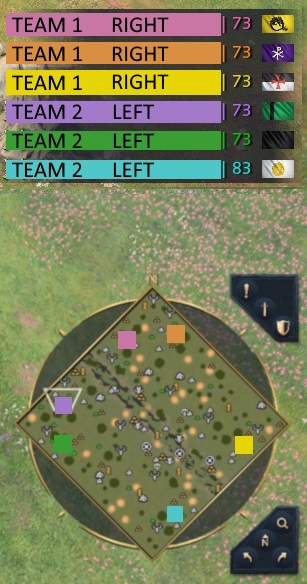
But actually we want our spawn points to be more equally set… On each size we choose so I changed a few settings:
-- SETUP PLAYER STARTS-------------------------------------------------------------------------------------------------
teamsList, playersPerTeam = SetUpTeams()

teamMappingTable = CreateTeamMappingTable()

-- CHANGED -> from 3.5 to 8. We want bigger distances between the players and since our map is pretty empty
-- (Except for the mountains) we can increase this value
minPlayerDistance = 8

minTeamDistance = 8.5

edgeBuffer = 1

-- CHANGED -> from 0.4 to 0.5. We can also increase our distance to the center in such an open map.
innerExclusion = 0.5

cornerThreshold = 2

playerStartTerrain = tt_player_start_classic_plains

impasseTypes = {}
table.insert(impasseTypes, tt_impasse_mountains)
table.insert(impasseTypes, tt_mountains)
table.insert(impasseTypes, tt_plateau_med)
table.insert(impasseTypes, tt_ocean)
table.insert(impasseTypes, tt_river)

impasseDistance = 2.5

-- CHANGED -> from 0.02 to 0.1. We have now a options of spawning about 10% instead of the strict 2%, it will increase the chance
-- to pick further locations from another player.
topSelectionThreshold = 0.1

startBufferTerrain = tt_plains

startBufferRadius = 2

placeStartBuffer = true

-- true since we created the mountains on each ROW at their center / otherwise we would had done it at each column's center
isVertical = true

-- Dont forget to add the isVertical AFTER the cornerThreshold
terrainLayoutResult = PlacePlayerStartsDivided(teamMappingTable, minTeamDistance, minPlayerDistance, edgeBuffer, innerExclusion, cornerThreshold, isVertical, impasseTypes, impasseDistance, topSelectionThreshold, playerStartTerrain, startBufferTerrain, startBufferRadius, placeStartBuffer, terrainLayoutResult)
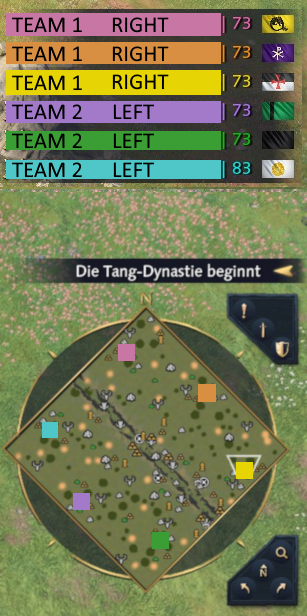
Our result in medium, large and gigantic maps looks like this:
Related
- Browse the API reference
- Debug your Mod